2 Channel Relay Module
Overview
As we may know, relay is a device which is used to provide connection between two or more points or devices in response to the input signal applied. In other words, relays provide isolation between the controller and the device as devices may work on AC as well as on DC. However, they receive signals from a micro-controller which works on DC hence requiring a relay to bridge the gap. Relay is extremely useful when you need to control a large amount of current or voltage with small electrical signal.
Wiring
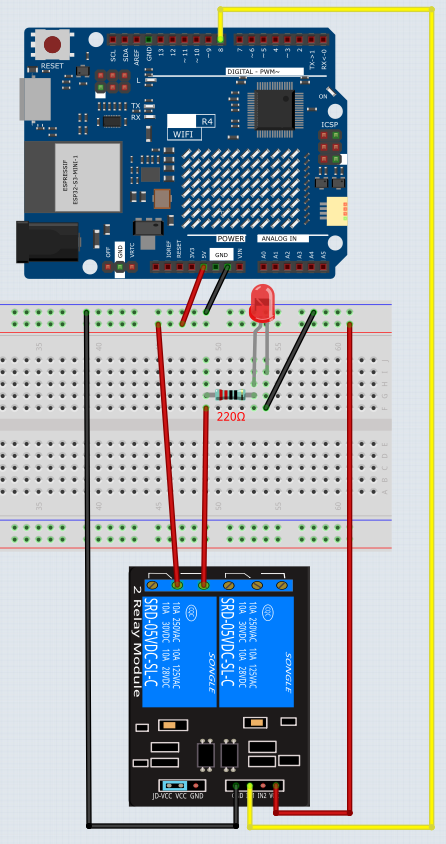
In this experiment, when the relay closes, the LED will light up; when the relay opens, the LED will go out.
Code
Note
You can open the file
11_Realy.inounder the path ofBasic-Starter-Kit-for-Arduino-Uno-R4-WiFi-main\Codedirectly.
Now, send a High level signal, and the relay will close and the LED will light up; send a low one, and it will open and the LED will go out. In addition, you can hear a tick-tock caused by breaking the normally close contact and closing the normally open one.
Code Analysis
void loop() {
  digitalWrite(relayPin, HIGH);  // Turn the relay on
  delay(1000);                   // Wait for one second
  digitalWrite(relayPin, LOW);   // Turn the relay off
  delay(1000);                   // Wait for one second
}
The code in this experiment is simple. First, set relayPin as HIGH level and the LED connected to the relay will light up. Then set relayPin as LOW level and the LED goes out.